


Happy Bob
3.288.00 Reviews
App Specs
- Version
- 1.15.2
- Updated On
- License
- Free
- Downloads
- 10,000+
- Developer
- Harald AI Oy
- Categories
- Medical
- Platform
- Android
Screenshots
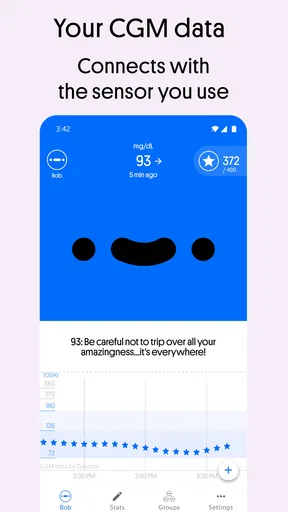
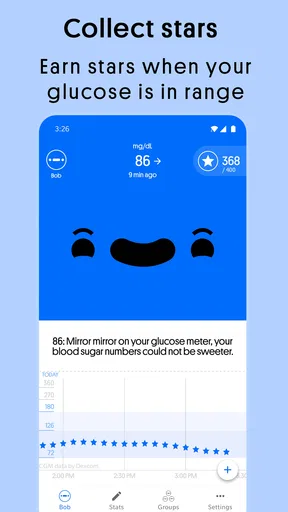
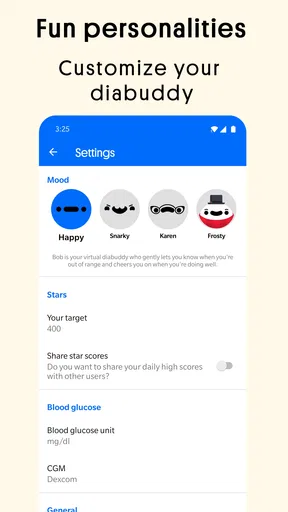
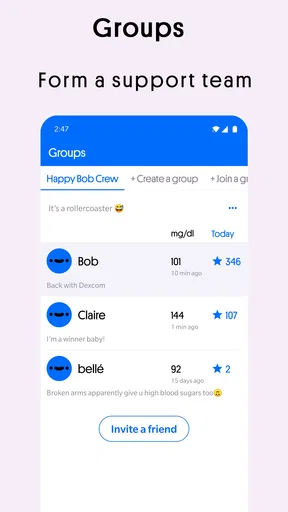
 Analysis by AppCompare
I approach a diabetes app differently from a typical fitness tracker: it needs to make information easy to check without pretending that encouragement replaces careful health decisions. Happy Bob takes a lighter route, pairing glucose tracking with a playful companion. That can make routine check-ins feel less clinical, though the humor will not suit everyone. I would see it as a layer around a diabetes-management routine, not as a reason to change treatment or ignore advice from a clinician.
What to expect when opening it
Happy Bob is a free medical app from Harald AI Oy, with optional in-app purchases listed from $5.99 to $69.99 per item. It has an average rating of 3.1 from 255 ratings, and 10K+ installs. Those figures suggest that it has found an audience, but they are not a substitute for deciding whether its tone and workflow fit your own needs. Its content rating is Everyone, and the current version is 1.15.1.
One practical question is whether it can fit into an existing setup. Happy Bob is described as an authorized Dexcom Connected Partner, so its clearest role is for people who already use compatible Dexcom-connected glucose data. Before relying on it, I would check the app’s current connection and device requirements against my own sensor and phone. A connected companion is useful only if the information I need actually arrives reliably on the devices I use.
I would also separate two jobs that can sound similar: viewing glucose information and making clinical decisions. A friendly character can help make regular attention easier, but I would not treat jokes, goals, or app feedback as medical instructions. For insulin decisions, symptoms, or unusual readings, the appropriate care plan and professional advice remain more important than any app’s presentation.
Speed expectations and busy moments
For an app centered on glucose updates, the important kind of speed is how quickly a useful reading becomes available when I open it, rather than how flashy the interface feels. The described connection to Dexcom data gives the app a clear purpose, but I would not assume that every reading appears instantly or that the app can eliminate delays in a connected system. If I need a number for an immediate decision, I would use the trusted source and method in my care routine rather than wait on a companion screen.
The heavier-use moments are likely to be ordinary ones: checking a reading while getting ready, glancing at the phone during work, or reviewing how the day is going before a meal. That is where a cheerful presentation could make repeated visits feel less like chores. The trade-off is that extra personality and engagement are helpful only when they do not distract from reading the actual information. I would make the data itself the focus and treat Bob’s commentary as optional color.
A useful habit is to decide in advance what I want the app to do for me. If the goal is a quick glance, I would keep the check-in brief and avoid turning every reading into a scorecard. If the goal is motivation, I would spend more time with the challenges and encouragement when I have the attention for them. That distinction helps prevent a playful design from making health tracking feel like another obligation.
Worth Reading Before You Choose

Flipboard Shows What News Apps Must Do Beyond the Feed

Switching to Android Auto Means Rethinking Your Driving Routine

Google Calendar Makes a Crowded Week Easier to Manage

Ludo King Makes the Most of the Minutes Between Plans

Baby Panda World Brings Quick Play to Modern Phones, but Its Game Library Feels Busy

ESPN’s Live Game View Makes Following Close Games Easier
Reliability and the role it should play
With any connected health app, reliability means more than staying open: the data has to be current enough for the task, and the connection needs to behave consistently with the user’s device setup. I would check that readings are appearing as expected before making Happy Bob part of a routine I depend on. If the display looks stale, incomplete, or different from the source I normally trust, I would pause and verify through that source instead of assuming the app is right.
That is not a reason to dismiss a companion app; it is a sensible boundary for one. Happy Bob’s appealing angle is making diabetes management feel friendlier, not replacing a sensor, a clinician, or a person’s established safety plan. I would use it to support awareness and engagement, while keeping a familiar backup way to check important information.
Device fit and the practical trade-offs
The app was released on September 15, 2020, and its minimum operating system requirement is version 8.0. That makes the stated baseline clear, but a phone meeting the minimum is not automatically a guarantee of a smooth experience. I would check current compatibility in the relevant app store, particularly if the phone is older or the operating system has not been updated. For a medical companion, a dependable device and connection matter more than squeezing the app onto a phone that is already struggling.
Storage and battery use are also worth judging in context rather than guessing from the app’s purpose. I would watch how the phone behaves during a normal day of connected use, especially if I already rely on it for sensor alerts and other health tools. If battery life or background connectivity becomes a concern, the first question is whether the phone and sensor connection are working as intended, not whether a playful screen is inherently demanding.
Who will get the most from it
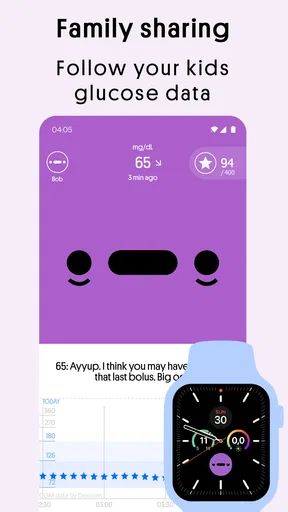
I can see Happy Bob suiting someone who already has a compatible Dexcom-connected routine and wants a more upbeat way to engage with glucose information. It may be especially appealing to a person who finds plain logs demotivating and enjoys humor, small goals, or a character that reacts to progress. Someone supporting a family member might also appreciate a friendlier conversation starter, while still respecting that diabetes management is personal and the person using the app should remain in control.
It is less compelling for someone who wants a neutral, clinical-looking record, dislikes sarcastic humor, or needs a tool that works independently of a compatible connected setup. It is also not the right choice for anyone expecting an app to diagnose a problem, replace medical care, or guarantee that every reading is immediately available. If a direct sensor app already gives you the information you need and you prefer minimal presentation, adding another layer may create more checking rather than less.
Making it useful without adding friction
A realistic use case is a busy morning: I check my usual glucose source as part of getting ready, then use Happy Bob when I have a moment to make the ongoing routine feel less stark. If Bob’s tone gives me a small lift, that is a genuine benefit; if I am rushed, I can keep the interaction focused on the reading and move on. The key is not to let challenges or points turn a health task into a demand to keep using the app when life is already full.
Another useful approach is to try the app during a low-pressure stretch before depending on it in a complicated situation. I would confirm that the connection is working, see whether the way information is presented makes sense to me, and notice whether the character’s comments feel encouraging or annoying over time. That trial can answer a more important question than first impressions: does the app make me more comfortable keeping up with my routine, or does it add another screen to manage?
Compared with a standard sensor companion or a simple glucose log, Happy Bob’s distinguishing idea is its personality and motivational framing. A conventional tracker may be the better fit for straightforward records and a restrained interface; Happy Bob may be more engaging for someone who wants lightness alongside the data. I would not choose between them based on entertainment alone. The better option is the one that presents the information I need clearly and fits the devices I already use.
Getting Started with Happy Bob
First things first, setting up Happy Bob is a breeze. You just download it from the App Store or Google Play, and bam, you're in! The app asks you to sync with your health data—no worries, it's all secure—and before you know it, you have Bob, your new companion, ready to cheer you on. Bob’s main gig is to make managing diabetes fun, but honestly, anyone looking to track their blood sugar or health stats could benefit from his charm.
The Interface and Features
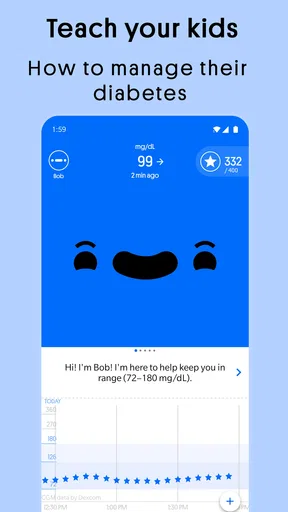
The interface is as friendly as Bob himself. It’s colorful, intuitive, and super easy to navigate. There’s no fumbling around trying to find what you need. The main screen shows your glucose levels, and Bob delivers them with a side of humor. Who knew a blood sugar reading could make you chuckle?
Here's a quick rundown of what you can expect:
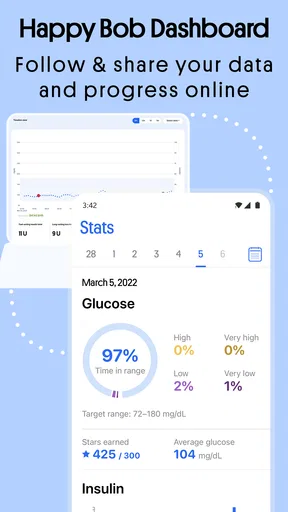
- Glucose Monitoring: Syncs with your device to provide real-time data.
- Personalized Feedback: Bob offers tips and encouragement based on your readings.
- Engaging Challenges: Keep things interesting with daily and weekly goals.
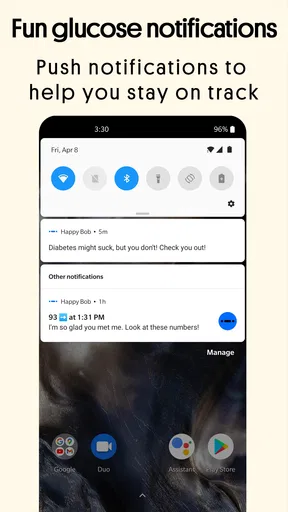
- Custom Notifications: Choose when and how you get alerts.
Bob’s Personality
What sets Happy Bob apart from other health apps is its personality. Bob is witty, sarcastic, and sometimes downright silly. If you’re having an off day, Bob’s little quips can bring a smile to your face. The app offers different "moods" for Bob, so whether you’re in the mood for some dry humor or something more upbeat, Bob’s got you covered. Switching between these moods is simple, and it really personalizes the experience.
Staying Motivated
Alright, let's talk motivation. We all know it can be tough to stay on track with health goals, but Bob has a knack for keeping you engaged. The app’s gamification elements—like earning points and completing challenges—make tracking your health feel less like a chore and more like a fun game. Plus, Bob’s constant encouragement helps keep you motivated even when your levels aren’t perfect.
Why Happy Bob Stands Out
I've tried a few health tracking apps in my time, but what makes Happy Bob stand out is its ability to blend utility with entertainment. It’s not just about the numbers; it’s about creating a positive experience around managing your health. Bob’s unique commentary and the app’s engaging design make it something you’ll actually look forward to using each day.
"Bob makes tracking your health feel less like a task and more like an adventure."
There’s something to be said for an app that can take a potentially mundane task and turn it into something you enjoy. With Bob, you’re not just keeping tabs on your health; you’re having a good time doing it.
Final Thoughts
So, is Happy Bob worth a download? If you’re looking for a fun, engaging way to manage your health data, then absolutely yes. It’s refreshing to see an app that doesn’t just focus on the cold hard facts but also on making the process enjoyable. Whether you’re managing diabetes or just want to keep an eye on your health, Bob’s quirky personality and helpful features make it a standout choice. Give it a shot, and who knows, you might just find yourself looking forward to your next health check-in.
Ready to meet Bob? You can find the app on both Android and iOS platforms. Happy tracking!
Pros
- Engaging and intuitive user interface.
- Customizable settings for personalized use.
- Offers daily motivational quotes.
- Tracks progress effectively and efficiently.
- Minimal battery consumption during use.
Cons
- Limited features in free version.
- Occasional ads may interrupt usage.
- Requires internet for full functionality.
- Certain features need better integration.
- User data privacy options are limited.
FAQs for Happy Bob
What is Happy Bob and what does it do?
Happy Bob is a unique app designed to make managing diabetes more engaging and less stressful. It connects with your glucose monitor to provide real-time data and motivational messages. The app uses humor and positivity to help users maintain better control over their diabetes management.
Is Happy Bob compatible with my glucose monitor?
Happy Bob is compatible with most continuous glucose monitors (CGMs) available on the market, such as Dexcom. Before downloading, it's important to check the compatibility list on the app's official website or app store description to ensure it works with your specific device.
Does Happy Bob require a subscription?
Happy Bob offers both free and premium versions. While the free version provides basic features, the premium subscription unlocks additional functionalities, including personalized motivational messages and advanced analytics. Users can choose the plan that best suits their needs and budget.
How does Happy Bob ensure data privacy and security?
Happy Bob takes user privacy seriously and employs robust encryption methods to protect personal data. The app complies with all relevant regulations, such as GDPR and HIPAA, ensuring that your health information is kept confidential and secure. Always review the app's privacy policy for detailed information.
Can Happy Bob be customized to fit my preferences?
Yes, Happy Bob offers a variety of customization options. Users can choose from different avatars and themes, set personalized goals, and adjust notification settings to receive reminders and motivational messages that suit their lifestyle. This flexibility makes it easier for users to stay engaged with their diabetes management.


